

Send email notification
- Posts: 68
- Joined: 13 Aug 2018
@Squalo: Good to hear that it's working now with a new batch file. Maybe there was something incorrect with the old batch file. But I didn't see where the error was.
- Posts: 10
- Joined: 15 Nov 2018
Unfortunately I never said it works :(@Squalo: Good to hear that it's working now with a new batch file. Maybe there was something incorrect with the old batch file. But I didn't see where the error was. TheExpert, 21 Nov 2018, 20:19
Here
I mean that i tried:I tried to create new batch, different folder, complete the task correctly (without stop) Squalo, 21 Nov 2018, 17:11
1)Create a new batch
2)Use different folders
3)I let the whole task finish the synchronization
Without results
- Posts: 68
- Joined: 13 Aug 2018
Where did you save your batch file? And where's your script saved? Both should be saved in the same folder. And the Const BatchFile shouldn't be defined with the path to the batch file. This should work when both files are saved in the same folder.
- Posts: 19
- Joined: 8 Nov 2018
@Squalo I have test the script that you attched and work without any error. I only change the program BatchFile to "FreeFileSync.ffs_batch" and add my email configs.
I think the problem is that you are putting the bat file (if you use), ffs_batch file and vbs in a wrong place. Like TheExpert say you need to put all in the same folder. Because when the vbscript try to find the log file name it get the name of the batch_ffs which is specified and if this name isn't the exact name you will get a error (for example if you put the path before the name or use a path in the bat script). This is my fist mistake... I have to change the way i call the vbscript file so that I have all the files inside de same folder. Like I already say before, I had need to put a bat file outside the folder to call a others bat files inside of different folders where I have different scripts.
I believe that the vbscript can be change so that is locations can be different maybe TheExpert can do something about it in the future. I think that changing the way the vbscript collect the log name (not the log local path) can resolve this problem.
Regards,
I think the problem is that you are putting the bat file (if you use), ffs_batch file and vbs in a wrong place. Like TheExpert say you need to put all in the same folder. Because when the vbscript try to find the log file name it get the name of the batch_ffs which is specified and if this name isn't the exact name you will get a error (for example if you put the path before the name or use a path in the bat script). This is my fist mistake... I have to change the way i call the vbscript file so that I have all the files inside de same folder. Like I already say before, I had need to put a bat file outside the folder to call a others bat files inside of different folders where I have different scripts.
I believe that the vbscript can be change so that is locations can be different maybe TheExpert can do something about it in the future. I think that changing the way the vbscript collect the log name (not the log local path) can resolve this problem.
Regards,
- Posts: 10
- Joined: 15 Nov 2018
I solved... TheExpert was right!
Without path of the batch and so the batch in the same folder of vbs, it worked!
Thank you very much to everyone
Without path of the batch and so the batch in the same folder of vbs, it worked!
Thank you very much to everyone
- Posts: 1
- Joined: 20 Mar 2019
Hi, is it possible to modify the script and send the email only if Errors/Warnings are present?
I'm not a vbs expert... :)
I'm not a vbs expert... :)
- Posts: 68
- Joined: 13 Aug 2018
@uaiz: Yes, this is possible but I wouldn't recommend it. You will never know if the sync has been started if there's no message for successful runs.
-
- Site Admin
- Posts: 7523
- Joined: 9 Dec 2007

Email notifications are now directly supported with FreeFileSync 10.20!
- Posts: 68
- Joined: 13 Aug 2018
Great :-). Thank you for implementing this feature. You forgot to mention that it's only available in the paid version. And is there a documetation for the configuration of it?Email notifications are now directly supported with FreeFileSync 10.20! Zenju, 15 Feb 2020, 09:50
-
- Site Admin
- Posts: 7523
- Joined: 9 Dec 2007
The best part is there's no configuration needed! You just enter the email address in sync cfg, and you're done!Great :-) You forgot to mention that this feature is only available in the paid version. And is there a documetation for the configuration of this? TheExpert, 15 Feb 2020, 10:08
The target audience are users who don't want to (or can't) fiddle with email send scripts. To make this "magic" work with maximum ease of use, I have to offer the FreeFileSync web server resources and reputation for email sending. But this requires that I minimize risk for abuse (e.g. spammers). This makes it a perfect fit for the FreeFileSync Donation edition, and it also only makes sense to offer for this version.
- Posts: 2
- Joined: 23 Mar 2020
Hello I need probably some help:
Just used the email notification available on the synchro config, but...
When errors, a popup reports the errors, and this popup needs to be closed manually before any notification is sent.
My use case: I want to be notified only when there are disk access errors (happens sometimes in my network) when I'm not in front of my computer.
Did I miss something?
Just used the email notification available on the synchro config, but...
When errors, a popup reports the errors, and this popup needs to be closed manually before any notification is sent.
My use case: I want to be notified only when there are disk access errors (happens sometimes in my network) when I'm not in front of my computer.
Did I miss something?
- Posts: 68
- Joined: 13 Aug 2018
What is the content op the popup? Which error messages do you get? Do you use the mail notification of FreeFileSync itsself or do you use a script for getting the error messages per mail?
- Posts: 2
- Joined: 23 Mar 2020
Yes it's the email notification from FreeFileSync.
Issue fixed. Just to activate "ignore errors" in comparison params, and no popup and notification sent. thx.
Issue fixed. Just to activate "ignore errors" in comparison params, and no popup and notification sent. thx.
- Posts: 68
- Joined: 13 Aug 2018
Hello all,
under viewtopic.php?f=2&t=2095&p=18563#p18563 you can find a new version of the VB script with a little bug fix.
Kind Regards
TheExpert
under viewtopic.php?f=2&t=2095&p=18563#p18563 you can find a new version of the VB script with a little bug fix.
Kind Regards
TheExpert
- Posts: 2
- Joined: 6 Jun 2020
Hi everyone.
I get this error:
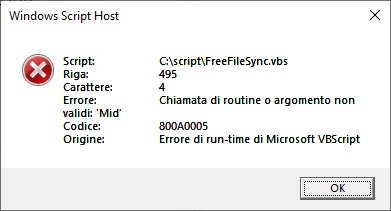
This is line 495:
I tried with version 10.11 with Windows Server 2008 and with version 10.24 with Windows 10.
What can I do?
Thanks.
I get this error:
This is line 495:
sLogFolder = Mid(sLine, x, InStr(x, sLine, "<" ) - x )
What can I do?
Thanks.
- Posts: 2
- Joined: 6 Jun 2020
I have solved.Hi everyone.
I get this error:
This is line 495:I tried with version 10.11 with Windows Server 2008 and with version 10.24 with Windows 10.sLogFolder = Mid(sLine, x, InStr(x, sLine, "<" ) - x )
What can I do?
Thanks. mircot80, 06 Jun 2020, 12:57
I hadn't activated: "Override default log path"
Thanks.
- Posts: 68
- Joined: 13 Aug 2018
I fixed a little bug in the VBScript and uploaded the new file to viewtopic.php?f=2&t=2095&p=18563#p18563.
- Posts: 2
- Joined: 8 Aug 2021
Hello,
Thank you for this great script!
Everything is running smoothly except that the email doesn't include errors and warnings. Here's an example of emails I get:
Thank you for you help! :)
--
EDIT: Fixed! Simply needed to select PLAIN TEXT as LOG FILE FORMAT.
Thank you for this great script!
Everything is running smoothly except that the email doesn't include errors and warnings. Here's an example of emails I get:
Is that the way the email is supposed to look like or is it incomplete?FreeFileSync batch UniServerZ running on PC-SALON
Synchronization completed with errors
Duration: 0 seconds
Log File: C:\Users\sylva\AppData\Roaming\FreeFileSync\Logs\UniServerZ 2021-08-08 103939.273 [Error].html
Error(s) and/or Warning(s)
____________________________
Thank you for you help! :)
--
EDIT: Fixed! Simply needed to select PLAIN TEXT as LOG FILE FORMAT.
- Posts: 11
- Joined: 10 Aug 2021
Hello,
first of all I want to thank for this script that works without problems from the first.
The only question I have, can the .xml log be inserted in the e-mail to be seen directly in it?
Like in the donation version.
a link for the screenshoot https://ibb.co/PmY1kkd
first of all I want to thank for this script that works without problems from the first.
The only question I have, can the .xml log be inserted in the e-mail to be seen directly in it?
Like in the donation version.
a link for the screenshoot https://ibb.co/PmY1kkd
- Posts: 68
- Joined: 13 Aug 2018
It's possible to attach the log file to the mail. But does it make sense? The script searches the log file for errors and shows the complete lines of the errors in the log file if there are errors.
- Posts: 11
- Joined: 10 Aug 2021
Hi and thanks for replay TheExpert,
it would be helpful for the sync status and computer name to appear in the email title.
that's how it appears to me now, maybe I was wrong somewhere.
link for the screenshoot
https://ibb.co/qFsn08f
it would be helpful for the sync status and computer name to appear in the email title.
that's how it appears to me now, maybe I was wrong somewhere.
link for the screenshoot
https://ibb.co/qFsn08f
- Posts: 68
- Joined: 13 Aug 2018
Yes, I can change the script to write status and computer name to the mail title if this would be helpful. At the moment I'm on holidays. So I can't do this now. Maybe I will change the script next week. I will update this thread when the new version of the script is available.
Looking at your last screenshot I see that you set the log file to HTML format. With this setting the script can't find errors in the log file. You have to set the log file format to plain text in FreeFileSync.
Looking at your last screenshot I see that you set the log file to HTML format. With this setting the script can't find errors in the log file. You have to set the log file format to plain text in FreeFileSync.
- Posts: 11
- Joined: 10 Aug 2021
Thanks for the reply and happy holidays,I follow the topic with interest when you return.
I also set plain text but it also appears the same. i have the 2021.02.14 - Version 1.17, without major changes, I just filled in the data.
I also set plain text but it also appears the same. i have the 2021.02.14 - Version 1.17, without major changes, I just filled in the data.
- Posts: 68
- Joined: 13 Aug 2018
Changing the log file format to plain text doesn't change the behavior of the script itsself: The mail title is the same as with HTML formated log files. But if there are errors with the synchronization all error lines in the log file are written completely to the mail body so you don't have to look into the log file itsself to see what's gone wrong.
- Posts: 11
- Joined: 10 Aug 2021
I set the report to be html and it appears the same, no error lines appear.
Image link
https://ibb.co/jTNBnPX
Image link
https://ibb.co/jTNBnPX
- Posts: 68
- Joined: 13 Aug 2018
As already written, you have to set plain text format for the log files in FreeFileSync. The script will then only show error lines in the mail body If there are errors.
- Posts: 11
- Joined: 10 Aug 2021
Hi TheExpert, now it works after I set plain text, if there are errors they appear in the e-mail.
Do you think that you can make the computer name appear in the subject of the message?
Thank you for support!
Do you think that you can make the computer name appear in the subject of the message?
Thank you for support!
- Posts: 68
- Joined: 13 Aug 2018
Hi bdum,
good to hear that everything is now working as expected.
When I understand you right, you wish to have the status and the computer name in the subject line. Is this correct? This is possible but the subject line will then get longer. You then will not see the complete subject in many mail programs. So ist it really useful to do this?
If you want to use rules for sorting incoming mails you can do this with searching for the keywords in the mail body, too. So there's no need to have this information in the mail subject.
I didn't had time for changing the script yet regarding the status in the subject. And before doing this I will first be sure, if this is useful.
Kind Regards.
good to hear that everything is now working as expected.
When I understand you right, you wish to have the status and the computer name in the subject line. Is this correct? This is possible but the subject line will then get longer. You then will not see the complete subject in many mail programs. So ist it really useful to do this?
If you want to use rules for sorting incoming mails you can do this with searching for the keywords in the mail body, too. So there's no need to have this information in the mail subject.
I didn't had time for changing the script yet regarding the status in the subject. And before doing this I will first be sure, if this is useful.
Kind Regards.
- Posts: 7
- Joined: 29 Apr 2016
Hi TheExpert,
look at the attachments if you approve you can update your script:
1. I create new const at row 226 so you can enable it by desire: "Const IncludeServerNameInSubject = False", change to "True" to write the name of machines in subject.
2. then at row 444 I inserted new variable for subject
I try it and seems to working fine in my server.
look at the attachments if you approve you can update your script:
1. I create new const at row 226 so you can enable it by desire: "Const IncludeServerNameInSubject = False", change to "True" to write the name of machines in subject.
2. then at row 444 I inserted new variable for subject
I try it and seems to working fine in my server.
- Attachments
-
- FreeFileSync.vbs
- (24.22 KiB) Downloaded 54336 times
- Posts: 11
- Joined: 10 Aug 2021
thanks timberetta. its works!
You're right TheExpert, the computer name in the subject doesn't help much. you can create the redirect rule in a folder. It would be helpful if ✔ or X also appears in the e-mail subject, where "Freefilesync result for batch batch name" already appears, it is more visible.
You're right TheExpert, the computer name in the subject doesn't help much. you can create the redirect rule in a folder. It would be helpful if ✔ or X also appears in the e-mail subject, where "Freefilesync result for batch batch name" already appears, it is more visible.
- Posts: 7
- Joined: 29 Apr 2016
It's helpful for me too to have in the subject the result of the sync.thanks timberetta. its works!
You're right TheExpert, the computer name in the subject doesn't help much. you can create the redirect rule in a folder. It would be helpful if ✔ or X also appears in the e-mail subject, where "Freefilesync result for batch batch name" already appears, it is more visible. bdum, 30 Aug 2021, 19:33
This is what I use by default:
I modified the script and this is the subject that I like to receive, I abbreviated freefilesync to FFS, to shorten the subject of the mail : [Status] FFS results for Batchname
e.g. [Success] FFS results for mybatchname
or [Warnings] FFS results for mybatchname
or [Errors] FFS results for mybatchname
or [Aborted] FFS results for mybatchname
I left in the script the const to decide to insert the machine name at the end of subject.
TO TheExpert: I don't want to fork your script so it's up to you if you need to integrate these changes and how. Thank you
- Attachments
-
- FreeFileSync_timberval.vbs
- (24.62 KiB) Downloaded 54076 times
- Posts: 68
- Joined: 13 Aug 2018
Hi all,
thank you for your ideas for changing the script and the implementations you've done. I changed now the script by adding the new constants 'IncludeServerNameInSubject' and 'IncludeSyncResultInSubject' to allow users to specify what to include in the email subject.
Here you can find the new version of the script: viewtopic.php?f=2&t=2095&p=18563#p18563
Hopefully, this is useful for you.
Kind Regards
TheExppert
thank you for your ideas for changing the script and the implementations you've done. I changed now the script by adding the new constants 'IncludeServerNameInSubject' and 'IncludeSyncResultInSubject' to allow users to specify what to include in the email subject.
Here you can find the new version of the script: viewtopic.php?f=2&t=2095&p=18563#p18563
Hopefully, this is useful for you.
Kind Regards
TheExppert
- Posts: 11
- Joined: 10 Aug 2021
Hello. everything is fine, but less of a problem. if batch is finally set to shut down the computer, the email no longer has time to be sent, and is no longer sent ...
- Posts: 68
- Joined: 13 Aug 2018
Yes, the script doesn't support the shutdown of the system. The shutdown in the batch is triggered by FreeFileSync itself. The script is waiting for the exit of FreeFilesync and has to do some more steps after finishing the synchronization. But if FreeFileSync is shutting down the computer all these steps won't be done by the script any more.
- Posts: 11
- Joined: 10 Aug 2021
thanks theExpert! is there no solution? In the donated version works, I know is not the same with vbs script, I have the donated version only for 3 devices, but it would be helpful for more.
-

- Posts: 2980
- Joined: 22 Aug 2012
Instead of having FFS shut down your system, have FFS launch a script (*.bat, *.com, *.vbs ,...)
that first executes the task to be executed and only then shuts down the system.
that first executes the task to be executed and only then shuts down the system.
- Posts: 11
- Joined: 10 Aug 2021
Hi Plerry, how can i do this? to close after the batch finishes? and e-mail have time to sent.
- Posts: 11
- Joined: 10 Aug 2021
Thanks for the idea! Nice! Job done!
I created a batch without auto-shutdown and put this vbs script at the end:
--------------------------------
Dim objShell, intShutdown
Dim strShutdown, strAbort
' -s = shutdown, -t 120 = 2 minutes, -f = force programs to close
strShutdown = "shutdown.exe -s -t 120 -f"
set objShell = CreateObject("WScript.Shell")
objShell.Run strShutdown, 0, false
Wscript.Quit
-------------------------------
now has time to email and close after.
I created a batch without auto-shutdown and put this vbs script at the end:
--------------------------------
Dim objShell, intShutdown
Dim strShutdown, strAbort
' -s = shutdown, -t 120 = 2 minutes, -f = force programs to close
strShutdown = "shutdown.exe -s -t 120 -f"
set objShell = CreateObject("WScript.Shell")
objShell.Run strShutdown, 0, false
Wscript.Quit
-------------------------------
now has time to email and close after.
- Posts: 68
- Joined: 13 Aug 2018
For me it's not clear what the variables 'intShutdown' and 'strAbort' are standing for because they aren't used in the rest of the code.
If the shutdown is working this way I can add an option to the script to do a shutdown, too. So it will be safe that all steps of the script are done before shutting down the computer. The analysis of the log files could take a long time if there are a lot of files and if the log files itself have a lot of lines.
If the shutdown is working this way I can add an option to the script to do a shutdown, too. So it will be safe that all steps of the script are done before shutting down the computer. The analysis of the log files could take a long time if there are a lot of files and if the log files itself have a lot of lines.
-
- Posts: 2980
- Joined: 22 Aug 2012
OK, but then why not simply define a "shutdown" command with sufficient delay in the "On completion:" command-line in FFS (as suggested there). You may only need to increase the delay from 60 to 120 seconds.
- Posts: 68
- Joined: 13 Aug 2018
Yes, this is possible. But again, you can't be sure that the script has finished before the computer is shutting down. And the shutdown is then always waiting the delay time even if it's not needed. For example when the sync is successful and the mail script doesn't have to search for errors in the log files.
For me it's OK if you set the shutdown in the FFS batch. This is very easy because you even don't need to write a script. But it may be not the best solution under all circumstances.
For me it's OK if you set the shutdown in the FFS batch. This is very easy because you even don't need to write a script. But it may be not the best solution under all circumstances.
- Posts: 11
- Joined: 10 Aug 2021
How to set in the ffs batch? Shutdown with delay?
-
- Posts: 2980
- Joined: 22 Aug 2012
At the bottom of the Synchronization Settings (F8) in the FFS GUI you find the "Run a command" option, where you select the condition to run the command, and to specify the command.
- Posts: 3
- Joined: 25 Nov 2021
Hi, you still around. I tried to download BLAT, but get a Sandbox malware warning from our ZScaler sw.we use blat (command line smtp sender)
the next line in bat file after FFS is blat, which sends log.
that's it teymur-bagirov, 14 Nov 2015, 12:24
- Posts: 19
- Joined: 8 Nov 2018
Hi,
Is there any way for the script to accept special characters, such as "ã". I'm trying to translate to Portuguese, but it doesn't accept some words that have special characters.
Thanks,
Is there any way for the script to accept special characters, such as "ã". I'm trying to translate to Portuguese, but it doesn't accept some words that have special characters.
Thanks,
- Posts: 19
- Joined: 8 Nov 2018
Ok, I managed to get the texts in the script to appear correctly by saving the script in ANSI format instead of UTF8 format. I don't know if it's the perfect solution, but it partially solved the problem. However, in the list of errors, the crazy characters still appear. When consulting the TXT log file, the text is show correct, even though the log file is in UTF8 format. Is it possible for the characters to all appear correctly?Hi,
Is there any way for the script to accept special characters, such as "ã". I'm trying to translate to Portuguese, but it doesn't accept some words that have special characters.
Thanks, sagitario, 11 Apr 2022, 17:25
Thanks,
- Posts: 5
- Joined: 16 Nov 2022
Hello everybody
I've two small problems with this script.
1st: I'm using it on many PCs and servers, with gmail as mail server, without an issue, but on a server with Windows Server 2022 it doesn't work. I suspect something is wrong in my configuration or in the server configuration, but even enabling debug in the script I can't find what's wrong. Do you have any suggestion how to debug the problem?
2nd: I red (maybe wrong) that if I enable the simple text logs the script is able to report in the email the warning or error lines. Well, I enabled simple text logs in FreeFileSync options ant the logs are correctly saved in simple text *.log format, but I still receive the emails with only error or warning in the subject, but no log warning/error lines in the text. Do you have any advice?
Thank you!
I've two small problems with this script.
1st: I'm using it on many PCs and servers, with gmail as mail server, without an issue, but on a server with Windows Server 2022 it doesn't work. I suspect something is wrong in my configuration or in the server configuration, but even enabling debug in the script I can't find what's wrong. Do you have any suggestion how to debug the problem?
2nd: I red (maybe wrong) that if I enable the simple text logs the script is able to report in the email the warning or error lines. Well, I enabled simple text logs in FreeFileSync options ant the logs are correctly saved in simple text *.log format, but I still receive the emails with only error or warning in the subject, but no log warning/error lines in the text. Do you have any advice?
Thank you!
- Posts: 68
- Joined: 13 Aug 2018
Regarding Windows Server 2022: I don't have an idea. Check the firewall settings regarding open ports for outgoing traffic for SMTP and SMTPS. Set the logging option for blocked connections in a file for the firewall. So you can see if there's a blocked connection by the firewall. Or there are security settings regarding VBScript.
Regarding log files: Yes, you're right. The script can only parse the text based log files of FreeFileSync and not the html logs. Have a look at the path where you save the log files. Is the same path set in the script? With the debug switch in the script you should see if the script is finfing and parsing the log files.
Regarding log files: Yes, you're right. The script can only parse the text based log files of FreeFileSync and not the html logs. Have a look at the path where you save the log files. Is the same path set in the script? With the debug switch in the script you should see if the script is finfing and parsing the log files.
- Posts: 5
- Joined: 16 Nov 2022
I'll check but I don't know if that's so simple cause in tebug mode I can see the sending email lines without errors o retryingRegarding Windows Server 2022: I don't have an idea. Check the firewall settings regarding open ports for outgoing traffic for SMTP and SMTPS. Set the logging option for blocked connections in a file for the firewall. So you can see if there's a blocked connection by the firewall. Or there are security settings regarding VBScript.TheExpert, 04 Aug 2023, 10:27
The log file path is red in the batch ffs file. Could it be cause FFS switched from english to italian for the file language whei I switched from HTML logs to Text logs?Regarding log files: Yes, you're right. The script can only parse the text based log files of FreeFileSync and not the html logs. Have a look at the path where you save the log files. Is the same path set in the script? With the debug switch in the script you should see if the script is finfing and parsing the log files. TheExpert, 04 Aug 2023, 10:27
- Posts: 68
- Joined: 13 Aug 2018
Oh, you switched from English to Italian? Then the log entries are probably Italian, too. So you have to change it in the script. There you find entries for English and German. Here you have to set the Italian wordings so that the script can find the log lines with errors or warnings.
