

I'm really sorry but I understood almost nothing.
I am forced to run as administrator both FFS and the .bat, how do I make that drive visible also in Windows Explorer?
OneDrive
- Posts: 29
- Joined: 11 Dec 2022
That's easy.
Simply run rclone twice. Once as administrator and once as you.
Two different drive letters.
I run rclone more than once on my machine to access different Cloud providers there's no reason why you can't run twice to the same cloud provider.
Drive X: for admin
Drive Y: for windows explorer
Simply run rclone twice. Once as administrator and once as you.
Two different drive letters.
I run rclone more than once on my machine to access different Cloud providers there's no reason why you can't run twice to the same cloud provider.
Drive X: for admin
Drive Y: for windows explorer
- Posts: 17
- Joined: 17 Oct 2018
.
-

- Posts: 2981
- Joined: 22 Aug 2012
@rianno : Trying to make your point?
- Posts: 29
- Joined: 11 Dec 2022
Okay but since I have to mount the drive at windows startup by starting it as a service, if I understand correctly, I will have to create one service that mounts a normal drive, which I can then see in explorer, and a second one that mounts a drive with administrator permissions which I will not see in explorer but I will see in FreeFileExplorer. Ok, I don't understand how to create a service that mount a drive as administrator.
OK.
It turns out that there is no need to create two separate services one as a regular user and the other as administrator.
I have successfully created a new service using nssm.exe. I am running it as the standard, default "System" account.
BOTH Windows file explorer AND rclone running as "administrator" can see the mounted drive.
This is the command I'm running.
rclone --config C:\Users\leo\AppData\Roaming\rclone\rclone.conf --log-file c:\users\leo\rclone-ODlog.txt mount leo-od: i: --vfs-cache-mode full
I'm using nssm.exe to create the service.
Here is a picture:
It turns out that there is no need to create two separate services one as a regular user and the other as administrator.
I have successfully created a new service using nssm.exe. I am running it as the standard, default "System" account.
BOTH Windows file explorer AND rclone running as "administrator" can see the mounted drive.
This is the command I'm running.
rclone --config C:\Users\leo\AppData\Roaming\rclone\rclone.conf --log-file c:\users\leo\rclone-ODlog.txt mount leo-od: i: --vfs-cache-mode full
I'm using nssm.exe to create the service.
Here is a picture:
- rclone service.png (15.14 KiB) Viewed 7587 times
- rclone service.png (15.14 KiB) Viewed 7587 times
- Attachments
-
- rclone service app.png (14.74 KiB) Viewed 7584 times
- Posts: 29
- Joined: 11 Dec 2022
Unfortunately, there must be something wrong....
I did everything as you said, I can install the service but if I try to start it I get this:
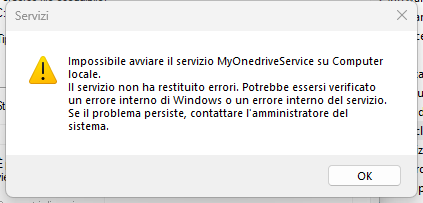
Translated is: "unable to start MyOnedriveService on local Computer. The service returned no errors. An internal Windows error or an internal service error may have occurred. If the problem persists, contact the system administrator."
I don't understand, I think I did everything right:
On NSSM I named the service: MyOnedriveService
Path: C:\ESEGUIBLE\rclone\rclone.exe
Sturtup directory: C:\ESEGUIBLE\rclone
Arguments:
A small description in "Details"
and no account login in "Log On" to run it as the system
I did everything as you said, I can install the service but if I try to start it I get this:
Translated is: "unable to start MyOnedriveService on local Computer. The service returned no errors. An internal Windows error or an internal service error may have occurred. If the problem persists, contact the system administrator."
I don't understand, I think I did everything right:
On NSSM I named the service: MyOnedriveService
Path: C:\ESEGUIBLE\rclone\rclone.exe
Sturtup directory: C:\ESEGUIBLE\rclone
Arguments:
rclone --config C:\Users\frenk\AppData\Roaming\rclone\rclone.conf --log-file C:\Users\frenk\rclone-log.txt mount Onedrive: O: --vfs-cache-mode full
and no account login in "Log On" to run it as the system
Is this the EXACT set of Arguments??
rclone --config C:\Users\frenk\AppData\Roaming\rclone\rclone.conf --log-file C:\Users\frenk\rclone-log.txt mount Onedrive: O: --vfs-cache-mode full
If so, you must remove the "rclone" at the beginning!
Does everything work properly when you run it from the command line? Before you install it as a service make sure that it functions exactly as you want it to.
Have you inspected the log file? Any errors that were generated during the mount process should be in there.
rclone --config C:\Users\frenk\AppData\Roaming\rclone\rclone.conf --log-file C:\Users\frenk\rclone-log.txt mount Onedrive: O: --vfs-cache-mode full
If so, you must remove the "rclone" at the beginning!
Does everything work properly when you run it from the command line? Before you install it as a service make sure that it functions exactly as you want it to.
Have you inspected the log file? Any errors that were generated during the mount process should be in there.
- Posts: 29
- Joined: 11 Dec 2022

YEEEEAAAAAAHHHH I did it!!! We did it!!! Thank you very much LeoW, it's all thanks to you!!!
Now the drive is mounted by rclone as a service and is perfectly visible in both windows explorer and FFS.
Thank you again for your patience...
Congratulations!
I owe you thank you also because I've been curious about this for a while and it wasn't until you posted an interest that I put in the effort to make it work.
I owe you thank you also because I've been curious about this for a while and it wasn't until you posted an interest that I put in the effort to make it work.
- Posts: 29
- Joined: 11 Dec 2022
One last thing sorry.... I just discovered that inside the rclone drive I can paste what I want, I can create a new folder,... but windows explorer doesn't let me create new files...
What can it depend on?
If I right click inside the main folder of the rclone drive I only have available: create new folder.
No new txt file, word file and so on as usual.
Maybe do I have to recreate the service with NSSM by entering my administrator login credentials in logon?
What can it depend on?
If I right click inside the main folder of the rclone drive I only have available: create new folder.
No new txt file, word file and so on as usual.
Maybe do I have to recreate the service with NSSM by entering my administrator login credentials in logon?
- Posts: 29
- Joined: 11 Dec 2022
...Perhaps it's time to address these questions to the rclone forum. I have been asking rclone things on the FreeFileSynch forum for weeks.
For gratitude for your help, if I solve I will come back here and write the solution
For gratitude for your help, if I solve I will come back here and write the solution
Not a bad idea at this point because I have little more to offer you for help.
I have an account there also. I asked questions and answer the few that I can. There are people there with far more expertise than I have.
I have an account there also. I asked questions and answer the few that I can. There are people there with far more expertise than I have.
- Posts: 29
- Joined: 11 Dec 2022
Ok, I created the topic "No file creation allowed in OneDrive rclone service" in rclone help and support forum
- Posts: 29
- Joined: 11 Dec 2022
Here I am, as suggested on the rclone forum I needed to add "-o UserName=frenk" to the end of the NSSM arguments which then became: . No other changes on NSSM configuration and now I can create any kind of file in the drive.
Thank you very much again LeoW!
--config C:\Users\frenk\AppData\Roaming\rclone\rclone.conf --log-file C:\Users\frenk\rclone-log.txt mount Onedrive: O: --vfs-cache-mode full -o UserName=frenk
Thank you very much again LeoW!
You're welcome! Glad everything is working now.
Thank you very much again LeoW! franksisco, 19 Sep 2023, 16:27
Don't worry about the system account having permissions because it needs to be able to write to everything that you needed to write to anyway the only concern that you need to be careful of is that if your laptop ever falls into somebody else's hands the cloud drive automatically mounts itself.
As convenient as it is, I refrain from service level mounting. The other side of the argument is you may very well have cloud drives mounting automatically like Google Drive or some people have OneDrive mounting already when their computer boots so there's no way to get around it.
Just enjoy it.
