
Feature request: Onedrive direct connection please!

Discuss new features and functions
Posts: 4
Joined: 13 Apr 2025

onedriveuser

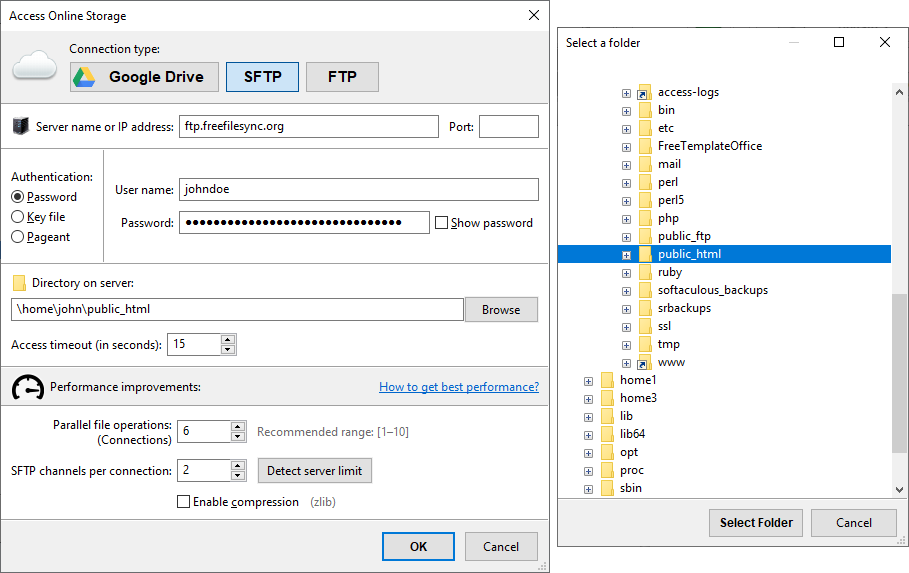
One of the best features of this app is allowing direct connection to Google Drive:

Image

This way you can backup your files directly to the cloud at an incredible fast speed and without needing the terrible Google client app that creates a lot of buffer files in the hardk disk and does not keep a good track of file modified dates (local copy mirror vs cloud).

It would be nice having the same for Onedrive, since Onedrive default client really sucks: does not allow to mount as local drive and stream files, if forces to have all files in default documents folder, it does not allow to exclude certain folders, etc.

I've tried all tools to mount Onedrive as drive letter in Windows: Netdrive, Airlite Drive, ExpanDrive, etc. All of them have the same problem: terrible upload speed (a few KB instead of MB speed), none of them have the feature of opening parallel connections to improve the speed.

Maybe you would answer why simply I don't I user Google Drive. Well, Microsoft supscription offers both Office 365 apps and 1 TB of Onedrive for a good price, I don't want having to pay two services (Google office application are terrible!).
Posts: 162
Joined: 5 Jan 2024

John1234

Hi,

Here is some information on how to make communication and data transfers to and from OneDrive faster than using the native OneDrive client that comes with Windows.

https://dictanote.co/n/1247841/
Posts: 4
Joined: 13 Apr 2025

onedriveuser

Hi,

Here is some information on how to make communication and data transfers to and from OneDrive faster than using the native OneDrive client that comes with Windows.

https://dictanote.co/n/1247841/ John1234, 18 Apr 2025, 00:07
Thanks for this post. It actually works and increases speed. However it would be nice having this on FreeFileSync. Rclone does not allow to mount drive in the background, it needs a command being executed in console everytime before syncing with an external tool.
Posts: 162
Joined: 5 Jan 2024

John1234

Hi @onedriveuser

I use a free utility called NSSM to load my arclone Mount command as a service in Windows so it starts automatically when I log in after Windows boots . If you try this software be sure to make sure that you set it to login as the same user ID as the person logging on to Windows rather than the system ID which is the default.

No need to do it manually each time you're ready to do a backup or a sink you can have Windows do it automatically when it boots let me know if you need any help finding it.


https://nssm.cc/
Posts: 4
Joined: 13 Apr 2025

onedriveuser

Hi @onedriveuser

I use a free utility called NSSM to load my arclone Mount command as a service in Windows so it starts automatically when I log in after Windows boots . If you try this software be sure to make sure that you set it to login as the same user ID as the person logging on to Windows rather than the system ID which is the default.

No need to do it manually each time you're ready to do a backup or a sink you can have Windows do it automatically when it boots let me know if you need any help finding it.


https://nssm.cc/ John1234, 18 Apr 2025, 16:45
Thanks, it works.

From the test I've done rclone mount schema seems to me a unstable for too many/large files, it is like the default sync works better.
Posts: 162
Joined: 5 Jan 2024

John1234

Hi,

If you don't have read write caching enabled you might want to try that and see if it helps because i use rclone with ffs to back up and synchronize files that are several gigabytes in size like movie files.

I back up one Cloud Drive to another Cloud Drive with free file sync so that I have my files in two places and I don't have any problems with large quantities of data.


Add this to mount command:
--vfs-cache-mode full

-vv will give you detailed output about what's happening.

Give caching a try and let me know if that helps.
Posts: 4
Joined: 13 Apr 2025

onedriveuser

Hi,

If you don't have read write caching enabled you might want to try that and see if it helps because i use rclone with ffs to back up and synchronize files that are several gigabytes in size like movie files.

I back up one Cloud Drive to another Cloud Drive with free file sync so that I have my files in two places and I don't have any problems with large quantities of data.


Add this to mount command:
--vfs-cache-mode full

-vv will give you detailed output about what's happening.

Give caching a try and let me know if that helps. John1234, 18 Apr 2025, 19:45
Thanks. This is very helpful.

Hopefully FreeFileSync developer will see this topic and add this feature so we don't need to use more tools to sync :)
Posts: 162
Joined: 5 Jan 2024

John1234

I agree that it would be nice to have it built in but asking the developer of this software to also develop connectivity solutions to a wide variety of cloud providers when there are other companies out there that are doing that specifically for a business I don't think makes good development sense.

You can always go with a commercial product that has OneDrive connectivity built in but that takes the fun out of it.

If you monitor what's going on in the terminal window when you run free file sync you will see with the -vv you might see an error code that you can address.

I do have to mention that Microsoft is making it more difficult for companies to make their own connectors to OneDrive. The method rclone used to use to get increased speed at Microsoft got taken away by Microsoft.
Posts: 162
Joined: 5 Jan 2024

John1234

Hi again.

There is a way to at least double your speed when using ms Azure to create a client ID and Secret which will let you generate a token to give you increased speed.

Without your own client ID and Secret creating a token you use a shared token amongst all users which slows things down quite a bit.

The documentation is now obsolete on this on the website but I will be assisting the developers and updating the documentation I believe I'm waiting to hear back from them.
Posts: 2
Joined: 2 May 2025

rohitbhave

Syncing with One Drive is a highly desired feature. I might want to sync something from my External HDD to One Drive and this feature will be extremely useful. Now a days the space on local SSDs is very limited, and placing huge files on the SSD may not be possible. With this feature we can sync External Drive or pen drives with One Drive without keeping files on our SSD (which has limited space)
Posts: 162
Joined: 5 Jan 2024

John1234

Let me know if you need help with azure it can be tricky. I'm working on another video training video right now but that will be a follow-up video.
Posts: 3
Joined: 9 May 2025

Mr.WoSch

I understand that there are alternatives ([r]clone, airlivedrive, WebDAV, ..) to a direct FFS connection to OneDrive.

However, the tools typically require local admin rights, and WebDAV requires specific open ports.
Both may not be available in restrictive corporate environments, while access through OneDrive Graph APIs over https may be granted.

Therefor the direct access to OneDrive using Graph APIs would be an enhancement that opens FFS to a larger community.