

Hi,
I'm writing to ask about a feature that I either don't know how to use or that might not exist. Basically, when I compare the folder I want to sync with the backup folder, the software gives me a list of all the files that need to be synchronized, organized by folder. However, I often find that there are a lot of files, and if I want to check whether there's a folder I need to exclude or not, I have to scroll a lot, which is really annoying. Would it be possible to add a feature to expand and collapse folders, so that I only see the folder name or the last folder in the path? That way, I could scroll much faster without going crazy.
Thanks for the help and love the project!
GLC
Expandable files list in compare view
- Posts: 1
- Joined: 24 May 2025
- Posts: 333
- Joined: 13 Apr 2017
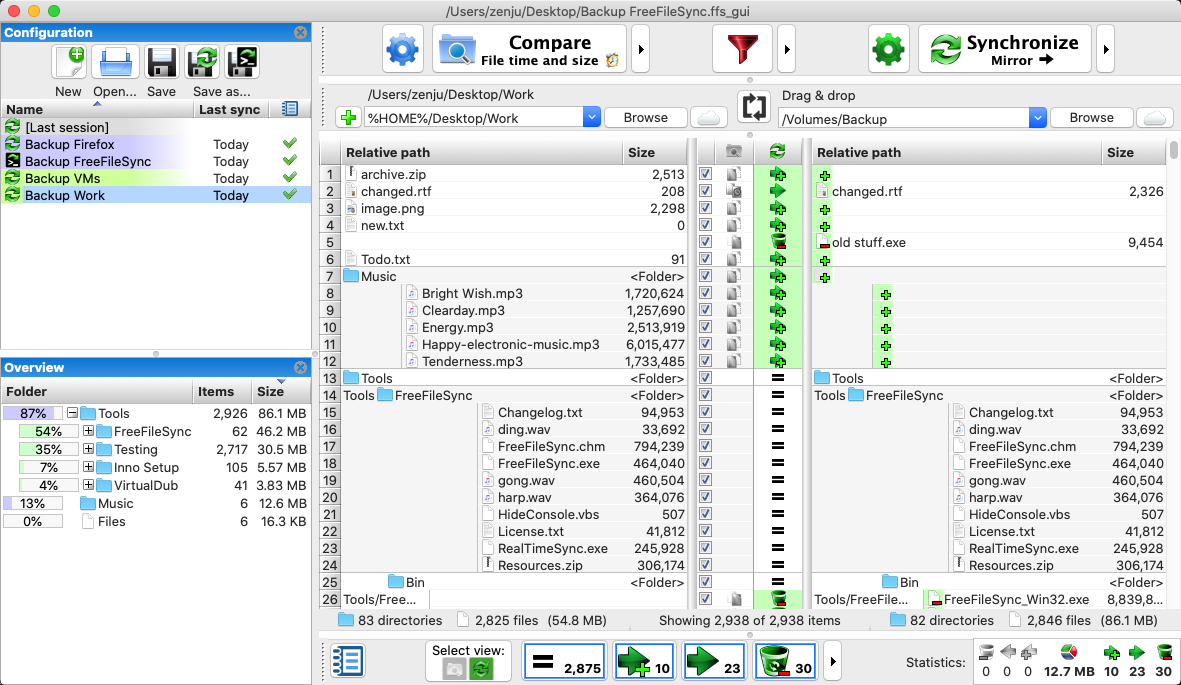
On the left, under the Configuration section, there is the Overview section with expandable/collapsible folders, may be this is what you are looking for.
- Posts: 15
- Joined: 16 Aug 2024
The Overview section is only useful to navigate the folders in the path (the main view, under Compare/Synchronize).
I agree with GLC, asking for a feature that really collapse or expand each folder in the main view.
Thank you for the project!
I agree with GLC, asking for a feature that really collapse or expand each folder in the main view.
Thank you for the project!