

I'm a newcomer to this excellent software. I have one query - the pane at the bottom right or left of the screen which shows the preview image or general information about a file or folder always seems to appear on the wrong side. Details about files and folders in the top right file pane appear in the bottom left pane and vice versa. If I swap the sides, the previews swap as well. Am I missing something?
Thanks
Folder and File information in the wrong pane
- Posts: 3
- Joined: 9 Mar 2021
- Posts: 3
- Joined: 9 Mar 2021
Sorry - message sent to the wrong forum.
-
- Site Admin
- Posts: 7566
- Joined: 9 Dec 2007

You mean like in this picture?
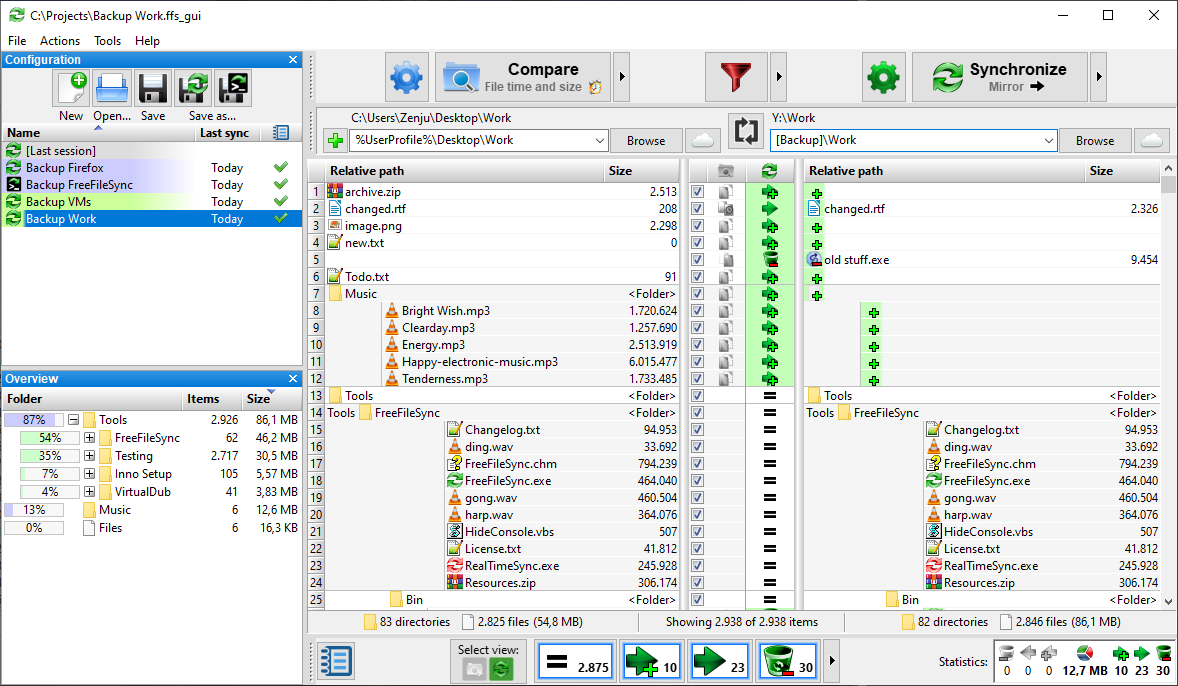
Generally there are two basic variants how the buttons can be layed out:
1. locate them on the same side as the file they represent
2. locate them on the side where the sync action will take place
FreeFileSync's comparsion view (see "Select view") uses (1), while the sync preview uses (2).
Are there improvements possible?
Generally there are two basic variants how the buttons can be layed out:
1. locate them on the same side as the file they represent
2. locate them on the side where the sync action will take place
FreeFileSync's comparsion view (see "Select view") uses (1), while the sync preview uses (2).
Are there improvements possible?
- Posts: 3
- Joined: 9 Mar 2021
Thank you very much for that reply. I'm sorry to say my question was intended for the FreeCommander app forum, and I found I was unable to delete it. I'm finding FreeFileSync to be an amazing piece of software that fills a gaping hole in Windows