

Hello,
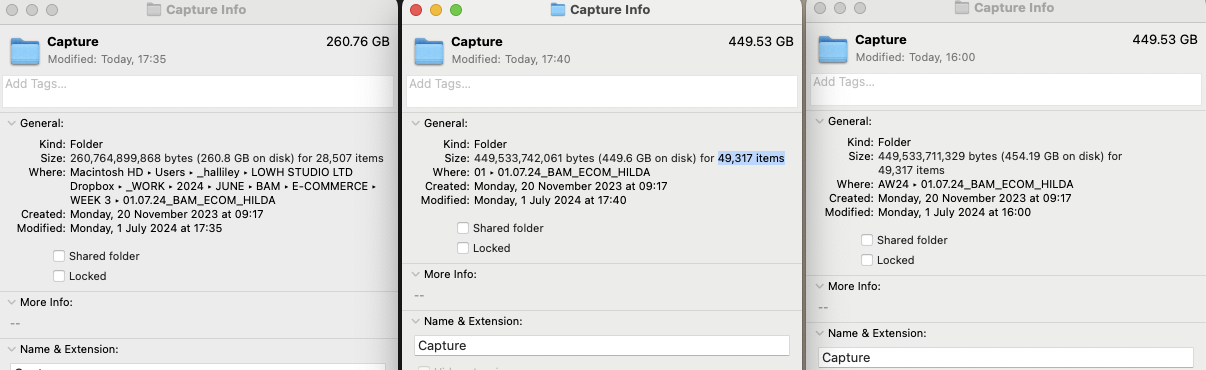
i've been using Real File Sync and I've noticed the back up folder when using RFS is nearly twice the size of the main folder.
I can't find any differences in the number of files but I'm wondering why the back is larger.
https://postimg.cc/svqPGCBv
I've attached a screenshot above.
Thanks.
Size of folder mismatch.
- Posts: 3
- Joined: 1 Jul 2024
-
- Site Admin
- Posts: 7566
- Joined: 9 Dec 2007

- Posts: 3
- Joined: 1 Jul 2024
Thank you. I can see that there are more files when viewing in finder but when I go into the main folder and compare numbers - there isn’t a difference. Would there be a temporary file somewhere that I’m missing?
- Posts: 1246
- Joined: 8 May 2006
In addition to the number of items (like with 49317 being the same in two instances), the size of those 49317 are also different.
What is the "main folder"? Is that "..._HILDA"?
"Compare numbers"? Is that the number of files? Does it include subdirectories too?
Does (is it "Finder") take hidden files into account?
Might there be duplicated files on the target end? I.e., that at one point you copied say from:
Mac -> 01.backup
& the next time you copied from
Mac -> 01.backup/01.backup or to Mac -> AW24.backup ?
(I'm not making too much sense out of the screenshots.)
Explain?when I go into the main folder and compare numbers - there isn’t a difference
What is the "main folder"? Is that "..._HILDA"?
"Compare numbers"? Is that the number of files? Does it include subdirectories too?
Does (is it "Finder") take hidden files into account?
Might there be duplicated files on the target end? I.e., that at one point you copied say from:
Mac -> 01.backup
& the next time you copied from
Mac -> 01.backup/01.backup or to Mac -> AW24.backup ?
(I'm not making too much sense out of the screenshots.)
- Posts: 3
- Joined: 1 Jul 2024
Hello!
Thanks for replying!
Sorry for not being clear. The file paths are on the screenshots.
The hard disk is left and the destination drives are the two on the right.
When I compare the files in finder they are the same in number but when I back up they double in size.
Weird.
To be totally honest, RFS keeps on crashing and freezing my computer. I'm not sure it's ready to trouble Chronosync for use in the photographic industry and the amount of files that/size that need to be backed up.
Thanks for replying!
Sorry for not being clear. The file paths are on the screenshots.
The hard disk is left and the destination drives are the two on the right.
When I compare the files in finder they are the same in number but when I back up they double in size.
Weird.
To be totally honest, RFS keeps on crashing and freezing my computer. I'm not sure it's ready to trouble Chronosync for use in the photographic industry and the amount of files that/size that need to be backed up.