

no access to files
- Posts: 3
- Joined: 13 Sep 2025
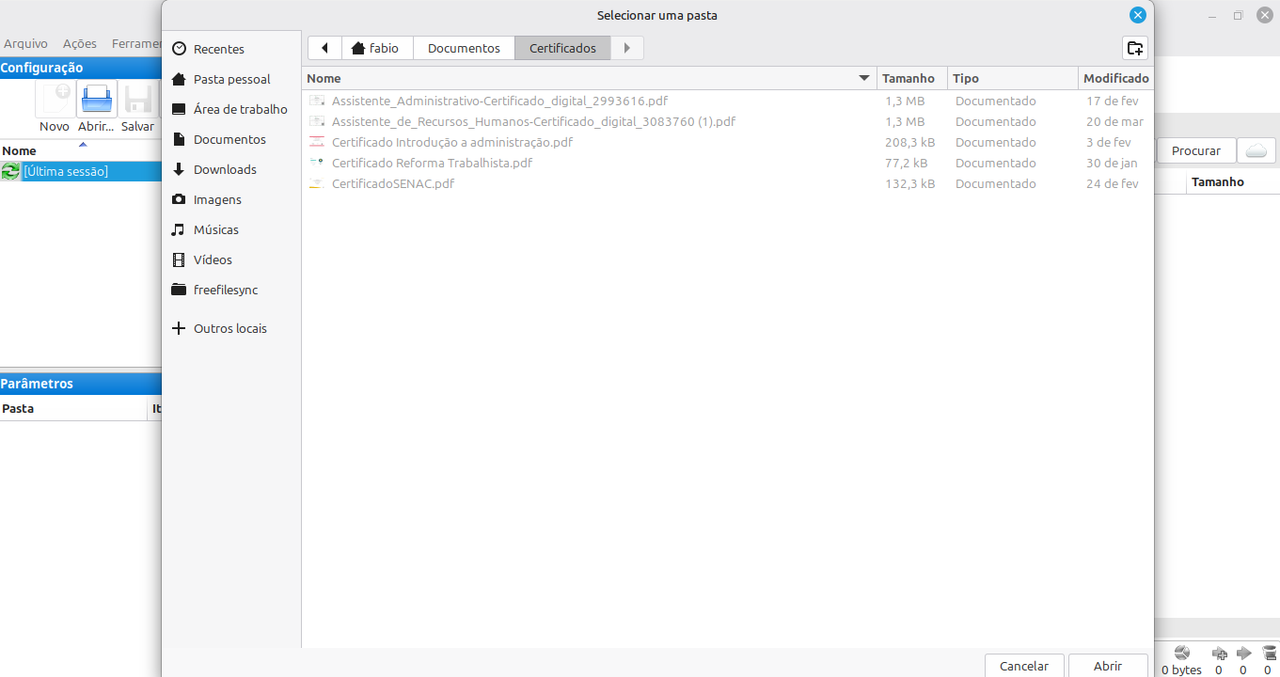
I use Linux Mint and installed FreeFileSync. When I search for files to sync, they are grayed out and I can't select them. I've used this app before, and no additional modifications were needed; it worked just by installing it. What should I do?
- Posts: 4941
- Joined: 11 Jun 2019
You first select directories to sync and then FFS finds the individual files to act upon. What does "grayed out" mean? Can you post a screenshot? Use the "Editor & Preview" button bellow to attach one.
- Posts: 3
- Joined: 13 Sep 2025
As you can see in the image, I can select the folder, but I can't select the file.You first select directories to sync and then FFS finds the individual files to act upon. What does "grayed out" mean? Can you post a screenshot? Use the "Editor & Preview" button bellow to attach one. xCSxXenon, 14 Sep 2025, 02:27
- Posts: 4941
- Joined: 11 Jun 2019
Perfect! That's because you don't select files to sync, you select directories.
Read this: https://freefilesync.org/faq.php#usage
Read this: https://freefilesync.org/faq.php#usage
- Posts: 3
- Joined: 13 Sep 2025
This is the problem, I can't select the files, it's grayed out as if I don't have access, it only allows me to see themPerfect! That's because you don't select files to sync, you select directories.
Read this: https://freefilesync.org/faq.php#usage xCSxXenon, 16 Sep 2025, 01:45
- Posts: 4941
- Joined: 11 Jun 2019
Try selecting a directory