Hello,
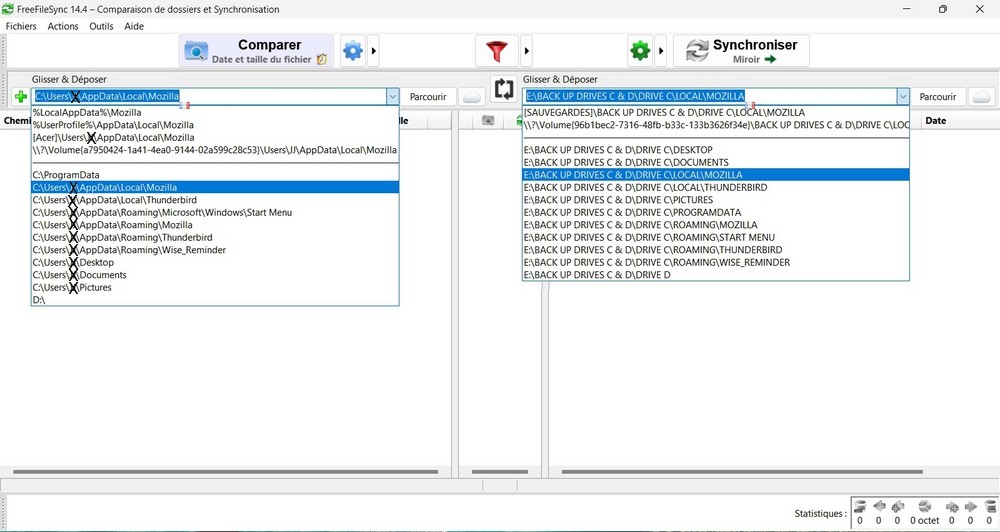
The left and right panels present the folders to compare and synchronise in a different order, although they were introduced at the same time.
It is therefore easy to make a mistake when clicking on a folder on the left then on the right.
Is there a way to have the folders facing each other be identical?
Thank you.
Folders to compare and synchronise
- Posts: 13
- Joined: 3 Nov 2014
- Posts: 4914
- Joined: 11 Jun 2019
What do you mean? Can you post a screenshot?
Do you have multiple folder pairs and you want to reorder them?
Do you have multiple folder pairs and the left/right locations are mixed up?
What does a "different order" mean? FFS displays the left and right side in the exact same order, matching each item on one side with the same relative path on the other.
Do you have multiple folder pairs and you want to reorder them?
Do you have multiple folder pairs and the left/right locations are mixed up?
What does a "different order" mean? FFS displays the left and right side in the exact same order, matching each item on one side with the same relative path on the other.
- Posts: 13
- Joined: 3 Nov 2014
How can i post a screenshot xCSxXenon ?
Drag and drop don't work here...
Do you have multiple folder pairs and the left/right locations are mixed up? Yes !
Thank you.
Drag and drop don't work here...
Do you have multiple folder pairs and the left/right locations are mixed up? Yes !
Thank you.
- Posts: 172
- Joined: 5 Jan 2024
To post an image it's easiest to upload the picture to a different website that allows you to share links to the picture. Personally, I put them either on my Google Drive or my OneDrive. There are websites if you search the internet that are specifically designed for you to be able to upload pictures that you can then post on this website and this feed.
Here is a sample from pcloud. You can get a free account from them just like you can get a free one from Google or Microsoft and put the file there.
https://u.pcloud.link/publink/show?code=XZALF15ZrJs3PzcQ7YRr2H7lphGSwfQ8UFgy
Here is a sample from pcloud. You can get a free account from them just like you can get a free one from Google or Microsoft and put the file there.
https://u.pcloud.link/publink/show?code=XZALF15ZrJs3PzcQ7YRr2H7lphGSwfQ8UFgy
-

- Posts: 2982
- Joined: 22 Aug 2012
- Posts: 13
- Joined: 3 Nov 2014
Thank you all !
here is the screenshot : https://i.postimg.cc/d0dcHRb1/2025-09-09-17-01-28.jpg
Each repertoire should be at the same height in the two panels to avoid errors
here is the screenshot : https://i.postimg.cc/d0dcHRb1/2025-09-09-17-01-28.jpg
Each repertoire should be at the same height in the two panels to avoid errors
- Posts: 172
- Joined: 5 Jan 2024
I goofed. You can also upload pictures directly just not from right here. You need to click on the editor and preview button. When you open the editor just below it will be an option to attach files like pictures.
Another way is to post a picture to this site: https://imgbox.com
They will give you a regular link and also this forum code below. I simply pasted the information below from their website into here and it brings up the picture.

Another way is to post a picture to this site: https://imgbox.com
They will give you a regular link and also this forum code below. I simply pasted the information below from their website into here and it brings up the picture.
[URL=https://imgbox.com/DvWFzxAL][IMG]https://thumbs2.imgbox.com/c0/76/DvWFzxAL_t.png[/IMG][/URL]
- Posts: 1223
- Joined: 8 May 2006
The folder pair "dropdown arrow" is not indicative of the selected folder pairs.
What shows on a particular folder pair line is what (pair of) folders are to be compared.
That dropdown arrow... oh, I'm not sure just what that is showing?
Maybe it is past history of selected folders? Or... ?
.
What shows on a particular folder pair line is what (pair of) folders are to be compared.
That dropdown arrow... oh, I'm not sure just what that is showing?
Maybe it is past history of selected folders? Or... ?
.
- FFS - folder pair dropdown arrow.png (58.49 KiB) Viewed 417 times
- Posts: 4914
- Joined: 11 Jun 2019
therude is correct. What you are showing here contains two things:Thank you all !
here is the screenshot : https://i.postimg.cc/d0dcHRb1/2025-09-09-17-01-28.jpg
Each repertoire should be at the same height in the two panels to avoid errors jeanpili, 09 Sep 2025, 19:28
1. Above the line contains alternative ways to specify the currently set location. FFS supports GUID, absolute paths, [LABELS], as specified here.
2. Below the line contains recently used locations, but they are not currently in-use.
- Posts: 13
- Joined: 3 Nov 2014
OK, thank you for the explanation Therude & xCSxXenon !
I use always the same folders to synchronize as you can see.
It's thus easier for me to click left and right the same folder in the lines below which contain recently used locations (and not to make a search - each time left and right - for the folder i want to synchronize and which appear on the above line as you say). I hope I'm making myself clear...?
That's why I'd like to find a way to put the elements below in the same order left and right.
I use always the same folders to synchronize as you can see.
It's thus easier for me to click left and right the same folder in the lines below which contain recently used locations (and not to make a search - each time left and right - for the folder i want to synchronize and which appear on the above line as you say). I hope I'm making myself clear...?
That's why I'd like to find a way to put the elements below in the same order left and right.
- Posts: 4914
- Joined: 11 Jun 2019
Hit the "+" icon on the left to add multiple pairs in one configuration. Then you don't have to switch them every time you change folders
- Posts: 13
- Joined: 3 Nov 2014
This is a perfect solution for those who synchronize everything with their eyes closed, as the result of comparisons in this case is rather confusing.
It becomes more complicated to find items to exclude or delete.
So it's not really what I'm looking for, but thanks for the suggestion xCSxXenon.
It becomes more complicated to find items to exclude or delete.
So it's not really what I'm looking for, but thanks for the suggestion xCSxXenon.
- Posts: 4914
- Joined: 11 Jun 2019
Save multiple configurations with one pair each then.
- Posts: 13
- Joined: 3 Nov 2014
This is indeed the best solution.
Initially, I had thought of modifying the C:\Users\XX\AppData\Roaming\FreeFileSync\GlobalSettings.xml, but the "FolderHistory" left and right are in the right/same order.
Thanks again xCSxXenon !
Initially, I had thought of modifying the C:\Users\XX\AppData\Roaming\FreeFileSync\GlobalSettings.xml, but the "FolderHistory" left and right are in the right/same order.
Thanks again xCSxXenon !