

Hi All,
I am using FreeFileSync on Mac OS Ventura 13.1 version. When I sync files, it syncs properly. But, when I click scan again, it's identifying the same files again, even though it copied these files just before this sync. Seems like some issue with identifying the modified timestamp. Is anyone else facing the same issue?
Thanks,
Chandra
Showing the same files again even after copying just now
- Posts: 1
- Joined: 7 Jan 2023
- Posts: 2
- Joined: 7 Jan 2023
I am also having the same issue on Mac OS Ventura 13.1 I thought it might have been an incorrect setting or something but must be an issue with identifying timestamps.
- Posts: 1246
- Joined: 8 May 2006
Is it all the files that it is finding again, or only some of them?
Don't know if applies, but, https://forum.scootersoftware.com/forum/beyond-compare-4-discussion/mac/89004-ventura-public-release-appears-to-have-a-serious-file-copy-issue-that-breaks-bc
Don't know if applies, but, https://forum.scootersoftware.com/forum/beyond-compare-4-discussion/mac/89004-ventura-public-release-appears-to-have-a-serious-file-copy-issue-that-breaks-bc
- Posts: 2
- Joined: 7 Jan 2023
Yes, all the files are being found again just after a completed sync. When you start this new sync it updates and overwrites whatever has been found which is a waste of time since I have it configured to mirror and it shouldn't be updating all items. Plus because of the large number of items I am syncing to a drive this takes 10+ hours to complete.
- Posts: 10
- Joined: 31 Mar 2026
This is EXACTLY what is happening to me.
For example, to test this, just now I mirrored from Disk 1 to Disk 2 of my NAS the file `2001. A Space Odyssey (1968).mkv`, both files having a file size of 10.4 GiB and the latter's timestamp now 2026-04-08T01:55:16. (The latter's timestamp *is* supposed to be different from the former's, right? I know, stupid question. Of course it is. Sorry.)
I then hit Compare again and it once again shows up on the list.
---
**OS**: Arch Linux
**DE**: KDE Plasma 6.6.4
**FFS Version**: 14.9 [Donation Edition]
For example, to test this, just now I mirrored from Disk 1 to Disk 2 of my NAS the file `2001. A Space Odyssey (1968).mkv`, both files having a file size of 10.4 GiB and the latter's timestamp now 2026-04-08T01:55:16. (The latter's timestamp *is* supposed to be different from the former's, right? I know, stupid question. Of course it is. Sorry.)
I then hit Compare again and it once again shows up on the list.
---
**OS**: Arch Linux
**DE**: KDE Plasma 6.6.4
**FFS Version**: 14.9 [Donation Edition]
-

- Posts: 3017
- Joined: 22 Aug 2012
If identically named left- and right-side files have different timestamps, when Comparing by "file time and size" (FFS's default), FFS will consider such files to be different, even if their size (and even content) is identical.
Depending on your synchronization settings, this "difference" between your left- and right-side file will result in proposed synchronization action, that will be executes when clicking "Synchronize".
E.g. in a Mirror sync, if your right-side file has a different (older or newer) timestamp than your left-side file, FFS will overwrite (update) the existing right-side file by its left-side counterpart.
Depending on the protocol and mounting method you use to connect to a resource, the timestamp of the left-side file can not be preserved when overwriting/updating your right-side file.
In such cases, the updated right-side file gets the timestamp of the moment of updating that right-side file.
This happens e.g. often when connecting the resource via the FTP protocol, but is not limited to that case.
During the next sync, the timestamp of the right-side file will then again be different (in casu: newer), so (in case of a Mirror sync) FFS will propose to (again) update the file right-side file.
FFS tries to maintain the timestamp, but is not able to, due to the used protocol or limitations in the resource's (NAS) operating system.
Depending on your synchronization settings, this "difference" between your left- and right-side file will result in proposed synchronization action, that will be executes when clicking "Synchronize".
E.g. in a Mirror sync, if your right-side file has a different (older or newer) timestamp than your left-side file, FFS will overwrite (update) the existing right-side file by its left-side counterpart.
Depending on the protocol and mounting method you use to connect to a resource, the timestamp of the left-side file can not be preserved when overwriting/updating your right-side file.
In such cases, the updated right-side file gets the timestamp of the moment of updating that right-side file.
This happens e.g. often when connecting the resource via the FTP protocol, but is not limited to that case.
During the next sync, the timestamp of the right-side file will then again be different (in casu: newer), so (in case of a Mirror sync) FFS will propose to (again) update the file right-side file.
FFS tries to maintain the timestamp, but is not able to, due to the used protocol or limitations in the resource's (NAS) operating system.
- Posts: 10
- Joined: 31 Mar 2026
Here is my synchronization settings:Depending on your synchronization settings Plerry, 13 May 2026, 11:43

I have a QNAP NAS, and it uses SMP.Depending on the protocol and mounting method you use to connect to a resource Plerry, 13 May 2026, 11:43
- Posts: 10
- Joined: 31 Mar 2026
Oops, I accidentally used a temporary file hoster site. Here is actually my synchronization settings:
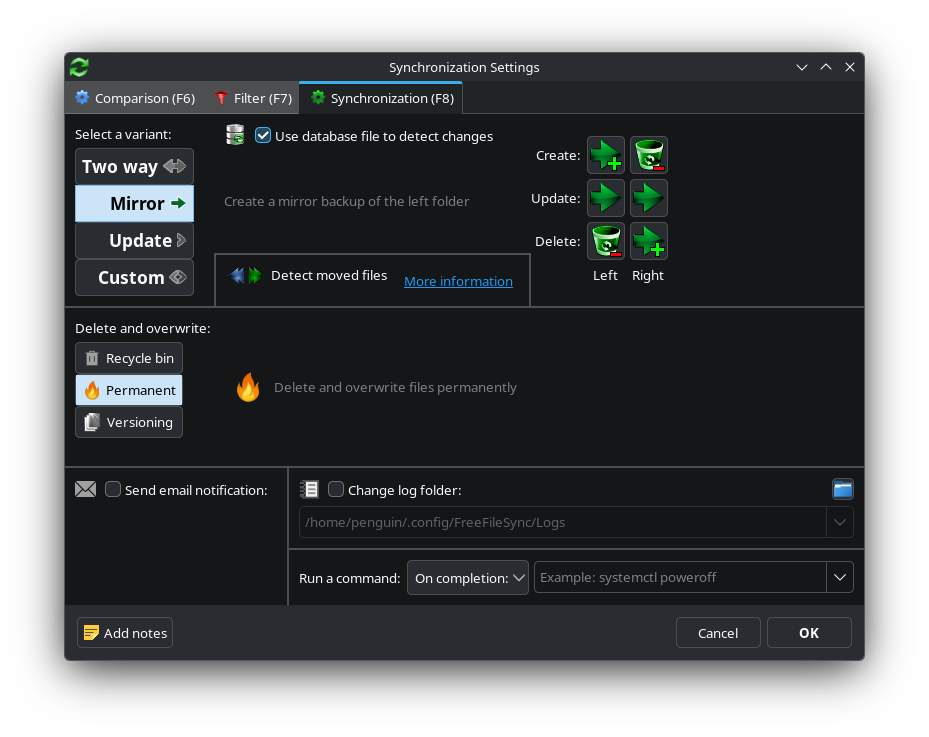
Also, for some reason, I can't seem to edit my comment (or whatever it's called), so I just wanted to correct myself: I have a QNAP NAS, and it is connected to my computer through SMB. (Not SMP.)
Also, for some reason, I can't seem to edit my comment (or whatever it's called), so I just wanted to correct myself: I have a QNAP NAS, and it is connected to my computer through SMB. (Not SMP.)
- Posts: 10
- Joined: 31 Mar 2026
Would someone be willing to help me figure this out please? I would be very grateful. :)
- Posts: 4941
- Joined: 11 Jun 2019
Make sure your QNAP is updated. I've seen timestamps mismatching caused by NAS firware/software.
- Posts: 10
- Joined: 31 Mar 2026
Okay, I just checked and yeah my QNAP is updated—the firmware as well as all apps. I then did a mirror sync and it said 3.33 TB was needed to be processed (4 new / 8722 updated). I did about 1 TB, then stopped the sync, and rescanned. It once again says I need to do 3.33 TB, or 4 new & 8722 to be updated.Make sure your QNAP is updated. I've seen timestamps mismatching caused by NAS firware/software. xCSxXenon, 21 May 2026, 14:05
-
- Posts: 3017
- Joined: 22 Aug 2012
If you run a Compare and then hoover your mouse over the icon mid between any of the items, FFS tells you why it thinks it needs to take the proposed sync action.
And, as written before, likely the timestamp of the right-side file differs from that of the left-side file, and hence FFS considers those files to be different.
And, as written before, likely the timestamp of the right-side file differs from that of the left-side file, and hence FFS considers those files to be different.
- Posts: 10
- Joined: 31 Mar 2026
It only does that when it's a file that needs to be added or deleted. I only have 7 files that are new; the other 8722 files I have are only files that need to be updated, and it doesn't say a reason.If you run a Compare and then hoover your mouse over the icon mid between any of the items, FFS tells you why it thinks it needs to take the proposed sync action. Plerry, 24 May 2026, 07:55
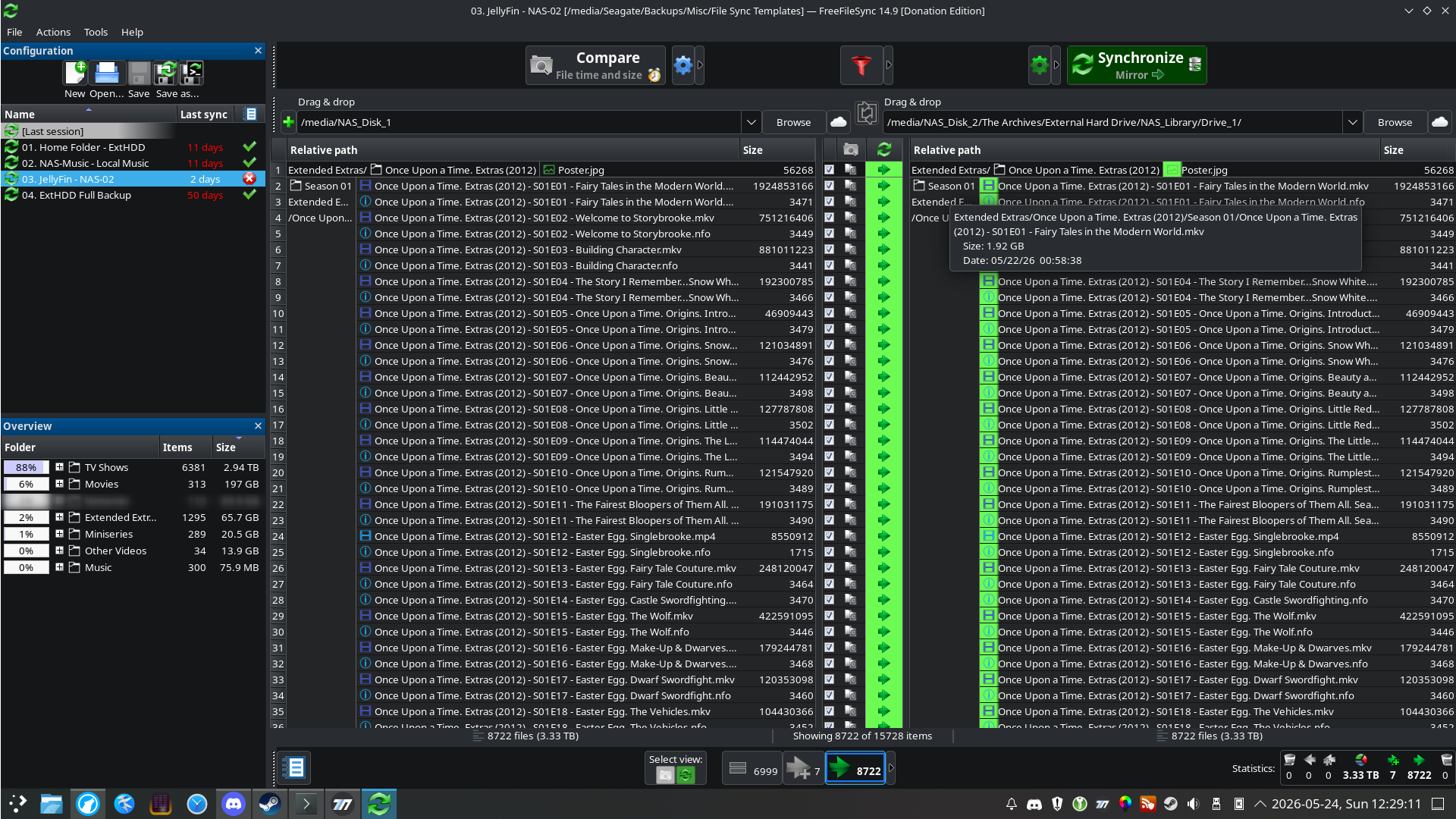
Yeah, it does. As you said earlier, it's probably because of how it's mounted.And, as written before, likely the timestamp of the right-side file differs from that of the left-side file, and hence FFS considers those files to be different. Plerry, 24 May 2026, 07:55
And as I said in reply to that comment, I'm connected via SMB. I also provided a screenshot of my synchronization setup above.Depending on the protocol and mounting method you use to connect to a resource, the timestamp of the left-side file can not be preserved when overwriting/updating your right-side file.
In such cases, the updated right-side file gets the timestamp of the moment of updating that right-side file.
This happens e.g. often when connecting the resource via the FTP protocol, but is not limited to that case.
During the next sync, the timestamp of the right-side file will then again be different (in casu: newer), so (in case of a Mirror sync) FFS will propose to (again) update the file right-side file. Plerry, 13 May 2026, 11:43
My goal here is to hopefully figure out how to fix this. Lol.
Also,
I'm no expert, so I may be wrong on this, but I don't believe it's a result of QNAP's operating system since it this didn't start until after I switched over to Linux from Windows.FFS tries to maintain the timestamp, but is not able to, due to the used protocol or limitations in the resource's (NAS) operating system. Plerry, 13 May 2026, 11:43
- Posts: 4941
- Joined: 11 Jun 2019
Make sure your distro is up to date also then. Also, I've seen multiple times where rolling back NAS firmware fixes these issues. With you running Linux, it's really hard to say since the implementation of NFS could be a cobbled together mess or it could be pristine. With that info, I would start reaching out in forums dedicated to your distrothis didn't start until after I switched over to Linux from Windows.
- Posts: 10
- Joined: 31 Mar 2026
I don't think it's likely to be related to my distro since this started happening when I switched from Windows to Linux Mint, and now I'm on Arch and it's been happening for months. And Mint & Arch not only have distinct bases (the former is Debian-based), but Arch is rolling-release so it's pretty on top of things in terms of being up-to-date.Make sure your distro is up to date also then. Also, I've seen multiple times where rolling back NAS firmware fixes these issues. With you running Linux, it's really hard to say since the implementation of NFS could be a cobbled together mess or it could be pristine. With that info, I would start reaching out in forums dedicated to your distro xCSxXenon, 25 May 2026, 06:58this didn't start until after I switched over to Linux from Windows.
But I'll do some searches regardless. Who knows?
(Also, just to re-iterate, I'm using the Donation Edition, so it's the official package. :) )
- Posts: 3
- Joined: 15 Jun 2026
Same problem here! And also QNAP and SMB!
The problem did not appear with AFP mounts with the same files. But since macOS kicked AFP out, I had to switch to SMB some days ago, and then the problems started.
When I experimented with letting out some of the directories, SOME files suddenly worked. When I delete the (identical) files on the QNAP, the problem stays. It seems that for some reasons the timestamp is wrong, all the files show today's copy date, not the timestamp of the originals.
It seems that FreeFileSync cannot change the timestamp into the past? And strange is, that this is repeatable for the same files again and again. And files where I don't see a difference. For example, there is a dir with 7 large MOV files, between 0.5 and 7 GB. They all have nearly the same timestamp a week ago and differ only in the minutes. So all have similar file names (A_S001_S001_T630.MOV ... T636). And T634 and T635 show the problem, the other five don't. Nothing special with these two files.
I tried: Set FreeFileSync to "1 Thread", set QNAP-SMB to "no async E/A", tried different SMB-versions with QNAP, nothing did help.
I guess it's a QNAP problem though?! (It has the actual firmware)
The problem did not appear with AFP mounts with the same files. But since macOS kicked AFP out, I had to switch to SMB some days ago, and then the problems started.
When I experimented with letting out some of the directories, SOME files suddenly worked. When I delete the (identical) files on the QNAP, the problem stays. It seems that for some reasons the timestamp is wrong, all the files show today's copy date, not the timestamp of the originals.
It seems that FreeFileSync cannot change the timestamp into the past? And strange is, that this is repeatable for the same files again and again. And files where I don't see a difference. For example, there is a dir with 7 large MOV files, between 0.5 and 7 GB. They all have nearly the same timestamp a week ago and differ only in the minutes. So all have similar file names (A_S001_S001_T630.MOV ... T636). And T634 and T635 show the problem, the other five don't. Nothing special with these two files.
I tried: Set FreeFileSync to "1 Thread", set QNAP-SMB to "no async E/A", tried different SMB-versions with QNAP, nothing did help.
I guess it's a QNAP problem though?! (It has the actual firmware)
- Posts: 3
- Joined: 15 Jun 2026
PS: If I copy these files by hand with the macOS finder, they get the original time stamp. So the Finder seems to copy better? Or is it a race condition which does not occur when copying some files manually?
-
- Site Admin
- Posts: 7566
- Joined: 9 Dec 2007

Interesting, could be an SMB driver bug.PS: If I copy these files by hand with the macOS finder, they get the original time stamp. So the Finder seems to copy better? Or is it a race condition which does not occur when copying some files manually? Jockel, 02 Oct 2026, 23:15
Let's try something: Setting creation and modification time in isolation.
Does the follwong version reliably set file modification times?
https://www.mediafire.com/file/hwr5873bltomzjj/FreeFileSync_14.13_beta_macOS.zip
- Posts: 3
- Joined: 15 Jun 2026
Whow, it works! Your beta copies all the files one last time, and they all get the correct timestamp! And on the next scan, no new files found. What a pleasure and what an incredible fast help!! Thanx!