The difference in FFS' behaviour when there's a database file (sync.ffs_lock) vs When there's not.

Get help for specific problems
Posts: 2
Joined: 14 May 2024

jawad

In a Mirror Job that's set to version deleted files.

If there's a database file to keep track of file movement, this should mean that when a file is moved, it is not deleted, but instead it is moved accordingly, replicating the action and folder structure of the backup source, right?

So, does this mean not having a sync.ffs_lock file would result in those moved files being recognised as deleted? So, I'll find them versioned, but also I'll see them created as new files in the new folder?

OR, does (not having a sync.ffs_lock file) mean that I might find the moved files in both locations, the folder it was in before its move, and after?

My FFS keeps on giving me Warnings of not having a directory lock and database file.
Warning Cannot set directory locks for the following folders:
Cannot write file "G:\sync.ffs_lock".
ERROR_FILE_NOT_FOUND: The system cannot find the file specified. [CreateFile]
And
12:25:53 Warning Database file is not available: Setting default directions for synchronisation.
I applied Administrator privileges, and it still tells me this. I also turned on "copy lock files".
But I'm also curious to know the difference I enquired about above.
TIA
User avatar
Posts: 2946
Joined: 22 Aug 2012

Plerry

You are mixing up two things:
• Locking folders involved in the sync by sync.ffs_lock files, as configured via the LockDirectoriesDuringSync flag and described in the Expert Settings.
• The use of a database for TwoWay syncs and for detecting moved, renamed and deleted files; as stored in sync.ffs_db files and described in the Synchronization Settings

The two warnings you describe strongly suggest the user under which credentials you run your FFS sync does not have write access to G:\, and hence can neither write a sync.ffs_lock file in G:\ (your first warning) nor a sync.ffs_db database file there (your second warning).
(Your FFS sync may then still run if G:\ is the source (left-side base location) of your Mirror sync.)
Having no write access to G:\ may be e.g. the result of running your sync as a scheduled task under the default user credentials System.
Possibly, if you run the same sync from the FFS GUI, it runs OK, because then it runs under the credentials of the logged-in user.

> So, does this mean not having a sync.ffs_db (database!) file would result in those moved files being recognised as deleted? So, I'll find them versioned, but also I'll see them created as new files in the new folder?

When using the database, a (source-side) moved file will be moved in the destination location (and not versioned); when not using the database, a (source-side) moved file will be deleted in its old destination location (and versioned), and copied (source=>destination) to its new location.

When running a Mirror sync, you should never end up with a copy of a moved file in both the old and new location, or a copy of a renamed file under the old and new name in your destination (right-side) location, irrespective if you use a database or not.

> ... that's set to version deleted files
When enabled, Versioning will always version deleted and updated files.
Posts: 2
Joined: 14 May 2024

jawad

Thank you very much. Excellent analysis!

1. My bad, I concluded that sync.ffs_db and sync.ffs_lock were directly correlated (that they both contributed to file move/rename/delete detection, and that both warnings related to them are due to the same reason).

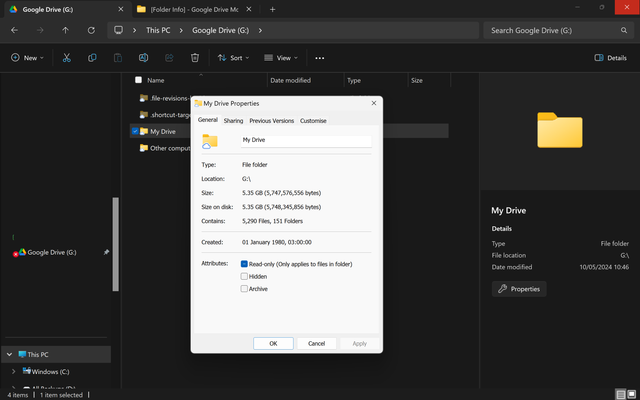
2.1. (G:\) is my Google Drive mounted to my Windows machine, BTW. (via Google Drive Desktop). Although it acts as a local drive, and by moving files to & from it, they would consequently be uploaded to/removed from Google Drive respectively. HOWEVER, you're right. Looking at the file attributes, it's partially read-only (despite my ability to move files from & to it, delete them, etc).
Image
(Also, I run tasks manually, through FFS GUI, no automation involved).

So, it's probably missing the necessary write permission to write the files?

2.2. I should mention that I have another job going where the source folder is (C:\Users\).
• I ran FFS (GUI ofc, always).
• The job involves the same settings previously mentioned (Mirror, DB enabled, versioning, etc).
• The first time I ran the job, I got the following error;
00:06:36 Warning Cannot set directory locks for the following folders:
Cannot write file "C:\Users\sync.ffs_lock".
ERROR_ACCESS_DENIED: Access is denied. [CreateFile]
• I stopped the job. Then ran it again, this time running FFS as an admin (unlike previous times).
• I set FFS to ignore errors, but I can see that the same number of warnings showed up as when I ran the job the previous time, so I'm led to believe that the same problem persisted. Can't confirm until I finish the job (unless I can check the log mid-job somehow?).
Image
I understand that there won't be a db file until after syncing for the first time, but should there be a db file even if that first sync job is stopped? I did start a job, I just stopped it, so shouldn't there be a db?

3. Thank you for the clarification regarding versioning & the DB's presence vs absence. Your explanation fit my use-case scenario perfectly. Thank you.

I just have to figure out how to get FFS to write those files, if they're not being written.
At this point, I'm not really sure if the lock files are even integral. But I do think the db will be plenty of help.
User avatar
Posts: 2946
Joined: 22 Aug 2012

Plerry

In your local attempt, you apparently sync C:\Users with some other location.
Be aware, that users, and (as far as I know) even users with administrator-rights, do by default not have write access to C:\Users; only to C:\Users\[UserA], where [UserA] is the home folder of the logged-in user.

If you want to Mirror-sync the entire C:\Users folder to some backup location, you need to assign the user under which credentials you want to run the FFS sync at least read access to all [UserX] folders in C:\Users.
If you specified C:\Users as your FFS left-side base location and want to use the FFS database and/or lock file, said user must even have write access in C:\Users (not necessarily write access to all [UserX] folders in C:\Users).