
FreeFileSync Open Source File Synchronization
 Download
 Forum
Forum


It looks like an ad blocker has blocked the ads.
 The FreeFileSync project is 100% dependent on ad revenue and donations to stay alive. Instead of the ads, and
after FreeFileSync has proven useful to you, please think about supporting with a donation.
The FreeFileSync project is 100% dependent on ad revenue and donations to stay alive. Instead of the ads, and
after FreeFileSync has proven useful to you, please think about supporting with a donation.
The FreeFileSync project is 100% dependent on ad revenue and donations to stay alive. Instead of the ads, and
after FreeFileSync has proven useful to you, please think about supporting with a donation.

FreeFileSync User Manual:
#Quick Start
Command Line
Comparison Settings
Daylight Saving Time
Exclude Files
Expert Settings
External Applications
Macros
Performance
RealTimeSync
RTS: Run as Service
Schedule Batch Jobs
Scripting
Synchronization Settings
(S)FTP Setup
Tips and Tricks
Variable Drive Letters
Versioning
Volume Shadow Copy
Daylight Saving Time (Windows)
Synchronization software often encounters ±1-hour shifts in file times after a Daylight Saving Time (DST) change. This typically happens when comparing a FAT32 or exFAT volume (referred to as "FAT") with an NTFS volume, such as when synchronizing a USB stick with a local disk. Files that were previously in sync are now shown as offset by one hour, even though they have not been modified.This occurs because NTFS stores file times in UTC format, while FAT stores them in local time.
When comparing times from these two formats, one must be converted to the other. Windows uses the current DST status and time zone for these calculations. As a result, the comparison is affected by current system settings, causing file times that were once the same to appear different after a DST change or time zone switch.
For more details on handling DST shifts in file times, see: Beating the Daylight Saving Time Bug
Solutions:
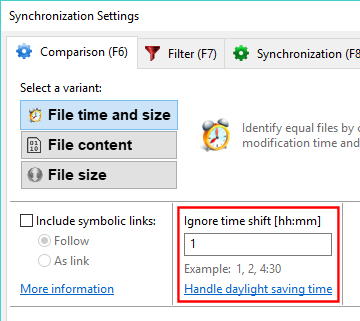
- In FreeFileSync's comparison settings, you can enter one or more time shifts to ignore during comparison:
To handle daylight saving time differences, enter a single one-hour shift.
If the differences are caused by changing the time zone, enter one or more time shifts as needed.
Note
File times must be equal or differ by exactly the specified time shift to be considered the same. Therefore, the time shift setting should not be confused with a time interval or tolerance.
- Alternatively, avoid the problem by only synchronizing FAT to FAT or NTFS to NTFS file systems. For example, since most local disks are NTFS and USB sticks are FAT, this issue can be solved by formatting the USB stick with NTFS as well.